HTTP Proxy Service
Kloud Team provides automatic HTTP proxy access to expose your pod services to the internet. Each service running in your pod can be accessed via a unique URL without manual port forwarding or complex networking configuration.
Overview
The HTTP proxy service automatically generates accessible URLs for any HTTP service running in your pod. This makes it easy to:
- Access Web Applications – Run web servers and access them directly via HTTPS
- Expose APIs – Make your APIs available on the internet instantly
- No Port Forwarding – No need to manage port forwarding rules
- Automatic HTTPS – All services are automatically secured with HTTPS
- Regional Access – URLs are scoped to your pod's region for low latency
URL Format
Your pod services are accessible using the following URL format:
https://{pod_id}-{port}.{region}.proxy.kloud.team/
URL Components
{pod_id}– Your unique pod identifier{port}– The port number your service is listening on{region}– The region where your pod is deployedproxy.kloud.team– The Kloud Team proxy domain
Viewing Proxy URLs in the Dashboard
You can view all active proxy URLs for your pod services in the Kloud Team dashboard:
- Navigate to Platform > Pods in the dashboard
- Select your pod from the list
- View the Pod Details section
- The Proxy URLs list shows all currently accessible HTTP services and their URLs
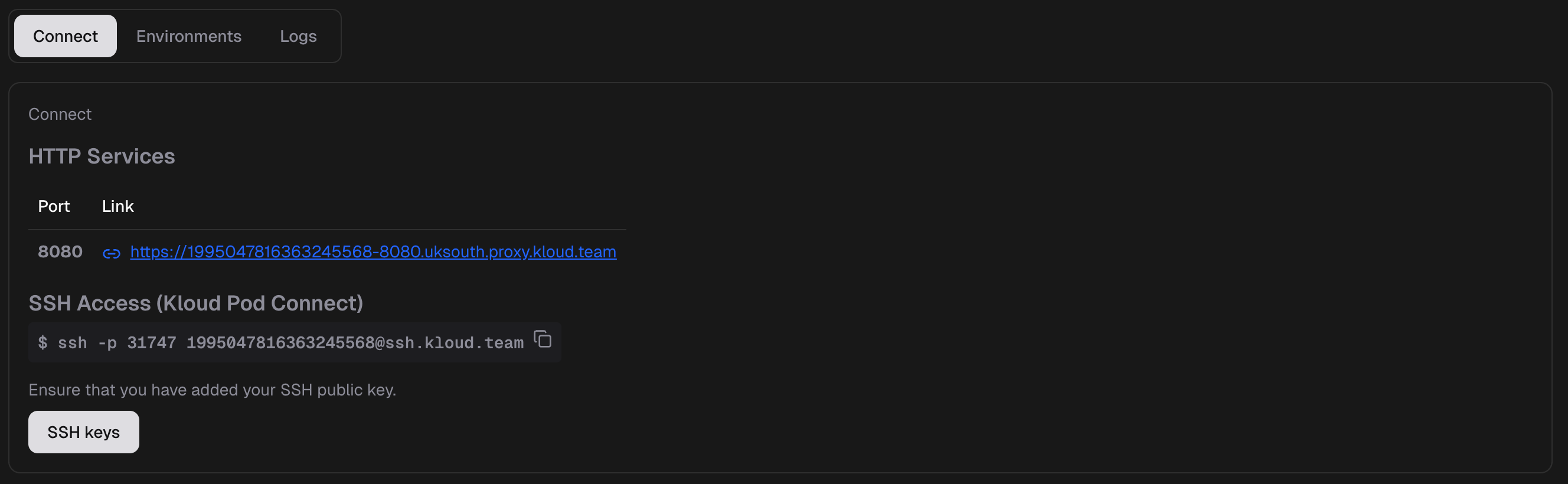
The dashboard displays:
- SSH Pod Connect – The SSH command to connect to your pod (copy-paste ready)
- Proxy URLs – A list of all exposed HTTP services with their accessible URLs
- Quick access to both connection methods from a single view
This makes it easy to track which ports are exposed and access your services directly from the dashboard.
Example URLs
Basic Web Server
If your pod ID is 1988698323669749760, running a web server on port 8000 in the euwest region:
https://1988698323669749760-8000.euwest.proxy.kloud.team/
API Service
Running a REST API on port 3000 in the euwest region:
https://1988698323669749760-3000.euwest.proxy.kloud.team/api/endpoint
Multiple Services
You can expose multiple ports from the same pod:
https://1988698323669749760-8080.euwest.proxy.kloud.team/  # Frontend
https://1988698323669749760-3000.euwest.proxy.kloud.team/  # Backend API
https://1988698323669749760-9090.euwest.proxy.kloud.team/  # Metrics
Using HTTP Services
Starting a Service in Your Pod
Connect to Your Pod
First, connect to your pod via SSH:
ssh -p 31747 {pod_id}@ssh.kloud.team
Start Your Application
Run your HTTP service on any port:
# Example: Python web server on port 8000
python -m http.server 8000

# Example: Node.js Express app on port 3000
node server.js

# Example: Python Flask app on port 5000
flask run --host=0.0.0.0 --port=5000
Important:
Make sure your application binds to 0.0.0.0 (all interfaces) rather than just localhost or 127.0.0.1 to be accessible via the proxy.
Access Your Service
Once your service is running, access it using the proxy URL:
# Using curl
curl https://{pod_id}-8000.{region}.proxy.kloud.team/

# Or open in your browser
https://{pod_id}-8000.{region}.proxy.kloud.team/
Best Practices
- Don't expose sensitive services – Be cautious about exposing admin panels or debug interfaces
- Use strong authentication – Always implement proper authentication for production services
- Monitor access logs – Keep track of who is accessing your services
- Rotate credentials – Regularly update passwords and API keys
- Use environment variables – Store secrets in environment variables, not in code
Troubleshooting
Service Not Accessible
If you cannot access your service via the proxy URL:
Check Service is Running
Verify your service is running inside the pod:
# Check if process is listening
netstat -tlnp | grep {port}

# Or using ss
ss -tlnp | grep {port}
Verify Binding Address
Ensure your service binds to 0.0.0.0, not localhost:
# Correct - binds to all interfaces
python -m http.server 8000 --bind 0.0.0.0

# Incorrect - only accessible from localhost
python -m http.server 8000 --bind 127.0.0.1
Test Local Access
Test if the service is accessible locally within the pod:
curl http://localhost:{port}/
Limitations
Current Limitations:
- HTTP/HTTPS Only – The proxy only supports HTTP/HTTPS traffic
- Port Forwarding Disabled – SSH port forwarding is not available (see SSH documentation)
- WebSocket Support – WebSocket connections may have limitations depending on configuration
Next Steps
SSH Access
Learn how to connect to your pods via SSH.
Deployments
Get started by creating and deploying your first pod.
Need Help?
Having trouble with HTTP services?
- Check the Getting Started guide
- Review SSH documentation
- Contact Support